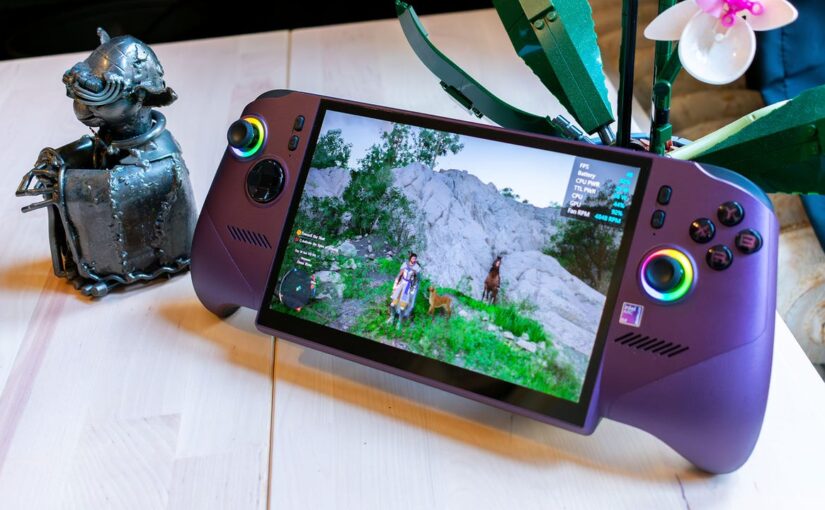

Ever since the Steam Deck launched in 2022, handheld gaming PCs have been growing steadily more powerful and expensive, and there’s no better example of that trajectory than the MSI Claw 8 EX AI+. Powered by Intel’s new Arc G3 Extreme handheld chip, MSI’s new handheld is an absolute behemoth, easily able to top 60 fps in some of the most demanding games at its native 1200p, albeit at medium to high presets.
However, this performance comes with a cost. The MSI Claw 8 EX AI+ starts at $1,799, making it the most expensive handheld from a mainstream PC maker. Part of that cost can be attributed to AI datacenters driving demand for memory and storage through the roof, but like the Steam Machine earlier this week, the price makes the MSI Claw 8 EX AI+ a niche product – at least for now.
Unlike the Steam Machine, though, performance is strong enough on this handheld that anyone looking for the best handheld performance no matter the cost just might want to give the MSI Claw 8 EX AI+ a look.
Purchasing Guide
The MSI Claw 8 EX AI+ is available now, starting at $1,799 at Best Buy. That’ll get you an Intel Arc G3 Extreme CPU, 32GB of RAM and a 1TB SSD.
MSI Claw 8 EX AI+ – Hands-On Photos
Wait, How Much?
Basically everything is getting more expensive in the face of our current RAM crisis, and handhelds are certainly no different. Just a few weeks ago, the Steam Deck, which had been a budget all-star for years, saw a price rise that put it neck-and-neck with the Xbox Ally. Likewise, the Lenovo Legion Go 2, which launched at an expensive-for-the-time $1,099 starting price, now starts at $1,499 for its plain Z2 configuration.
It’s unfortunate that MSI has to launch the Claw 8 EX AI+ in this AI-fried market, but the price tag absolutely reflects it. The handheld will set you back $1,799 for its one configuration, netting you the new Arc G3 Extreme processor, 32GB of RAM, and a 1TB SSD. That price puts it right up against the now $1,799 Lenovo Legion Go 2, and in that matchup, MSI looks incredible. Because while this new Claw 8 EX AI+ doesn’t have a fancy OLED screen, it’s up to 55% faster than the Legion Go 2.
But the elephant in the room is the Asus ROG Xbox Ally X, which will set you back $999 right now, somehow avoiding the price increases that are hitting basically every other product on the market.
The Claw 8 EX AI+ is much faster than the Xbox Ally X, and even has a larger, brighter display, but it costs nearly twice as much. For most people that just want the best value, the MSI Claw 8 EX AI+ just isn’t it right now. But, if all you care about is getting the best handheld performance at any cost, well, it’s hard to argue with the Arc G3 Extreme’s results.
Design and Features
The MSI Claw 8 EX AI+ almost looks like someone took the Xbox Ally X and then just stretched it out a little bit. MSI clearly took some notes from Asus’ handheld, with the same controller-like flared grip on the bottom left and right corners of the Claw 8 EX AI+. Honestly, I wish more handhelds would start to adopt this design, because it does feel a bit more natural in hand.
It helps, too, that these flared grips have a nice texture to them, stopping them from feeling slippery after a couple hours of gaming. However, the sheer size of this handheld stops it from being quite as comfortable as the Ally X.
The Claw 8 EX AI+ is 11 inches wide and weighs in at 1.7lb. That’s far from the heaviest, or even the largest handheld I’ve reviewed, with the Legion Go 2 weighing in at a massive 2.03lb. But, unlike Lenovo’s handheld which had comparatively narrower controllers, I seriously have to stretch my thumb a bit to reach the menu buttons on the Claw 8 EX AI+.
The menu buttons are about 3.5 inches up from the bottom of the device, and a little more than 2 inches in from their respective edges. And to add on to the finger-stretching, the buttons are laid out in such a way that the ‘start’ and ‘select’ buttons are further up, while the buttons that bring up the Game Bar and MSI’s software are lower.
I cannot tell you how often I accidentally brought up the MSI Center M software when I just wanted to pull up the map in Crimson Desert. That’s annoying on its own, but for some reason, whenever I dismissed this software, to tab back into the game I was playing, the Claw 8 EX AI+ wouldn’t automatically refocus the game window, which meant I had to tap the screen with my finger to get the controller to work again. Once again, the most annoying part of using a Windows handheld is software.
It’s not all annoying though. The Game Bar button on the left side of the display will bring up a quick settings overlay, where you can swap between different performance modes, as well as toggle a few settings like screen brightness and RGB lighting.
While the rest of the buttons are about what you’d expect on many modern controllers, with the regular face buttons and some back paddles, the Claw 8 EX AI+ has Hall Effect analog sticks and triggers. They feel great right out of the box, and the Hall Effect sensors mean they should last for years before you experience stick drift. I would have preferred TMR (tunneling magnetoresistance) sticks for their improved energy efficiency, especially at $1,799, but hey, I’ll take Hall Effect over a traditional potentiometer sensor.
Along the top of the MSI Claw 8 EX AI+ are two Thunderbolt 4 ports, along with a MicroSD card reader and a headphone jack. I love that having a second port has become the norm with modern handhelds, but I would have rather MSI found a way to move one of them to the bottom of the device.
Speaking of the bottom of the device, the Claw’s display extends a bit beneath the rest of the chassis, so that it’s flush with the flared ends of the controller. This design looked wild when I first saw it, but it is growing on me. It allows MSI to use a large 8-inch display while having a smaller chassis than last year’s Claw 8 AI+. I do wonder how durable this display will be over time, but the plastic is more than thick enough to prevent any kind of catastrophic bending.
Gaming and Performance
The MSI Claw 8 EX AI+ is powered by the new Intel Arc G3 Extreme SoC. This is extremely similar to the Intel Core Ultra 9 388H found in the Asus Zenbook Duo that launched back at CES 2026, but with two of the Performance cores disabled. However, while the CPU was cut back a bit to fit into a handheld’s needs, Intel included the full-fat Arc B390 GPU, with its 12 Xe-cores.
But, really, the biggest difference between the Arc G3 Extreme and the AMD Ryzen Z2 Extreme is its age. You see, when the Z2 family launched, it launched with dated architectures for both its CPU and GPU, which meant there wasn’t much improvement over the Z1 Extreme that preceded it. That’s not the case with the G3 Extreme. This is built on Intel’s Panther Lake platform, which is powering all of its current-generation laptops, and it makes a huge difference.
Just compared to last year’s MSI Claw, which was built on Intel Lunar Lake, the Claw 8 EX AI+ is as much as 47% faster in 3DMark Time Spy and 54% faster in Cyberpunk 2077. A lot of that comes down to the Arc G3 Extreme having 12 graphics cores to the Intel Core Ultra 7 258V having 8, but that’s only part of the story.
Even compared to the AMD Ryzen Z2 Extreme, the Intel G3 Extreme is a huge improvement. In Cyberpunk 2077, the Claw 8 EX AI+ gets 54 fps at 1080p with the High preset and XeSS set to performance. The Lenovo Legion Go 2, with the same settings, only manages 37 fps. That’s a 37% lead for MSI against a handheld that, at the time of writing, costs the same amount of money.
The Xbox Ally X hurts the Claw 8 EX AI’s value proposition quite a bit, though. While that handheld was tested at 1080p, rather than 1200p, the Ally X gets 44 fps in Cyberpunk at the High preset, with FSR set to Quality. That narrows the Claw’s lead to about 20% – give or take a few points for the difference between 1200p and 1080p – despite its 57% lower cost.
But while the Claw 8 EX AI+ has more raw graphics performance than other handhelds, it also has multi-frame generation. This tech uses the NPU to insert AI-generated frames in between each rendered frame of the game you’re playing.
At its core, this technology isn’t new to handhelds – AMD’s frame gen technology has been available since the Steam Deck. With XeSS frame gen, though, Intel is able to generate up to three AI frames for each “real” frame, which really helps saturate the Claw 8 EX AI’s 120Hz display.
Nvidia famously introduced multi-frame generation as part of DLSS 4 back in 2025, and since then the technology has been controversial, because it can introduce added latency and visual artifacts. The same is absolutely true for Intel’s iteration, but I will say that it feels fine on such a small screen.
Playing Crimson Desert, frame generation brought me from about 40-45 fps to around 155 with frame gen set to 4x. And while that came at the cost of some latency, I didn’t really notice, likely because the game is slow enough for 10-15ms of added latency to not matter all that much. Instead, the game looked a lot more smooth, just by virtue of having more frames sent to the display.
Your mileage will vary, of course, but whether or not you choose to use it, I’d still rather have the option than not.
When Intel was telling me about the Arc G3 Extreme, it said that two performance cores (or P-Cores) were disabled to promote better battery life. And, while that probably did make a big difference, the Claw 8 EX AI+ didn’t fare much better than the Z2 Extreme-equipped handhelds I’ve tested.
In Procyon, which tests battery life through Microsoft Office applications, the Claw did extremely well, lasting a whopping 13 hours. However, when I set a timer and just laid in bed playing Crimson Desert, the battery died after 2 hours and 14 minutes. That’s not worse than I’d expect from the Lenovo Legion Go 2 or the Xbox Ally X, but it’s not exactly better, either. In fact, it falls pretty much right in line with those two devices, which lasted 2 hours and 17 minutes, and 2 hours and 34 minutes, respectively.
However, baked into the G3 Extreme is a new Endurance mode. Basically, when this is enabled, your framerate will be locked to 30 fps (by default – you can configure this in Intel’s graphics utility), and power will be limited beyond that. In games where you’d otherwise get north of 60 fps, this will make a massive difference to battery life, but obviously it’ll have less impact if you’re barely hitting that performance threshold in the first place.
Jackie Thomas is the Hardware and Buying Guides Editor at IGN and the PC components queen. You can follow her @Jackiecobra