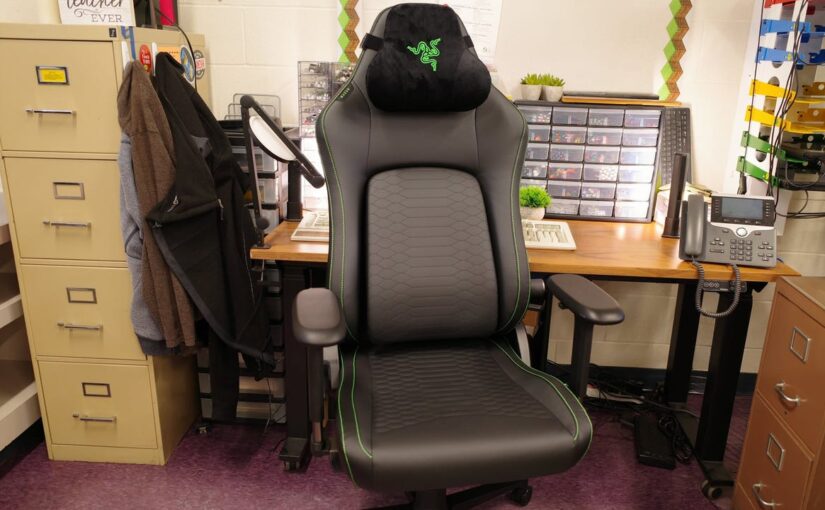

Since its debut in 2020, the Iskur has reigned supreme as Razer’s flagship gaming chair. Just as the Iskur V2 replaced the original and became one of the best gaming chairs, the aptly named Iskur V2 NewGen has arrived to become the new standard Iskur in Razer’s line-up. Its updates are subtle, but they make this already great gaming chair even better.
Razer Iskur V2 NewGen – Hands-on Photos
Razer Iskur V2 NewGen – Design and Features
While the vast majority of gaming chairs are content to offer race car-like aesthetics and bucket-style seats, the Razer Iskur’s iconic snake-inspired design stands apart. It’s still unmistakably a gaming chair – and a big one at that – but its appearance is more “Razer” than it is “sports car,” and that makes it unique in today’s gaming landscape.
While it feels original, there is no mistaking it for anything but a gaming chair. While it sets itself apart from more generic gaming seats, it shares enough DNA that it’s clearly meant to appeal to “classic” gaming tastes. The backrest and seat are wide enough that I never felt “hugged” in place and was free to cross my legs if I felt like it. Both still feature aesthetic bolsters, however. There’s also Razer’s large three-headed snake logo behind your head (or more correctly, behind the included memory foam pillow) and if you choose the classic black and green, bright accent stitching also pops against the black EPU leather.
If you’re considering the Razer Iskur, though, there’s a good chance you’re choosing it because of its look, not in spite of it. Razer has done a good job of giving the chair a strong visual identity, but the design backs it up with solid build quality and ergonomics.
The snakeskin lumbar support is more than just flashy looks. Behind its upholstery, Razer has implemented an adjustable lumbar system that leverages knobs on either side to position its height and depth. This iteration includes Razer HyperFlex technology which allows it to react to your movements and supply consistent support as you shift position. In theory, you should be able to dial in the support to perfectly match your body, though in practice, it always felt slightly aggressive to me. I didn’t mind, but someone else might.
It also offers a range of other adjustments to cater to different types of gaming or upright work. It features a Class 4 piston, supporting gamers up to 300 pounds, and can extend to offer a height range of 17 to 21 inches. The wheelbase is aluminum for long-term durability and was easily able to support me lying into its 152-degree recline. Sitting upright, its rocking motion can be locked, or you can lock it into a leaning position if that’s your preference. It also features the staple tension knob under the seat to adjust how much resistance you feel when leaning back.
The armrests are worth remarking on for their comfort above all. The foam cushioning Razer uses is clearly chosen with real gamers in mind, leaning in toward their monitors during intense matches. In short, they’re made to be leaned into without causing you pain, and work exceptionally well. The armrests offer all of the expected “4D” adjustments for height, depth, width, and angle. Razer’s armrests always seem to offer a little bit of extra height, and that’s also the case here. It’s a small touch, but altogether, these “4D armrests” wind up feeling slightly more versatile than others carrying the label.
The upholstery is excellent, and more breathable than the prior Iskur V2. It uses Razer’s Gen-2 EPU leather with CoolTouch technology and claims up to 13 times improved durability over traditional PU leather. Time will be the ultimate judge of durability, but taking a concerted look at improving the breathability and cooling of a faux leather chair is always worth the effort. If you’re unconvinced, one case of the mid-summer back sweats will set you right, don’t worry.
The other big upgrade coming with the Iskur NewGen is the addition of dual-density foam into the seat. In essence, Razer has added a softer upper layer to the seat while maintaining the same high-durability cold-cure foam underneath. The result is a more comfortable out-of-the-box seating experience without the loss in support that would usually follow as a trade-off.
Overall, the changes with this release are small, but since the NewGen is replacing the existing version, this “new” release feels more like a way to add some extra features and keep the Iskur line competitive while the V3 cooks. It’s a slightly better version of the Iskur V2 we know and love, and since there’s no price increase to go with it, it’s essentially Razer offering more for your money. I’m good with that.
Razer Iskur V2 NewGen – Assembly
Assembling the Razer Iskur V2 NewGen is completely standard if you’ve ever built a gaming chair before. If you haven’t, Razer provides everything you’ll need right in the box, including a detailed set of instructions, all of the tools you’ll need, and even a pair of soft fabric gloves so you don’t sully its metal parts with your fingerprints.
There aren’t many surprises to be had here, but given the size and weight of the chair, it is beneficial to have an extra set of hands when it comes time to flip it over. Razer has done a good job of simplifying the process, however, so you should be able to do all of the assembly solo if you can get past that last step. The armrests come pre-installed, for example, and installing the backrest was much simpler thanks to a helpful bracket.
With photos included, assembly took about 20 minutes by myself. Newcomers should find it to be an easy project.
Razer Iskur V2 NewGen – Comfort and Performance
Given how similar it is to the original Razer Iskur V2, it should come as no surprise that the Iskur V2 NewGen is even better. As I mentioned in the earlier section, the quality of the upholstery and broader construction is excellent. Given its high asking price, it should feel like a premium seat and truly does, even in comparison to stalwarts like DXRacer and Maxnomic.
I was a fan of the lumbar system on the original V2 and it’s largely the same here. Razer’s HyperFlex system does a good job of being able to match the curvature of my back and provide the support I need, as well as offering flexibility to match my movements throughout the day. Once I had it dialed, I was able to use it across full work days without back or neck pain.
Part of this is because of the lumbar support system, but it is also because the backrest is contoured around the shoulder to guide you toward its center where its cushioning can best distribute your weight and avoid pressure points that lead to soreness over time. This isn’t snake oil: follow the performance seating industry into its upper echelons and you’ll find that the best chairs consider these same qualities to an even greater degree. How cushions apply pressure to your body makes a difference, which means how and where your body meets those cushions also matters.
I also have to give kudos to Razer for its excellent neck pillow. While it’s hardly the only company to offer a memory foam pillow with its chairs, it’s shaped to cradle your neck and head and is just oh-so comfortable. I only wish it were magnetic so repositioning it was easier.
The NewGen’s CoolTouch EPU fabric is noticeably softer than traditional PU leather, though I didn’t notice it to be cooler in my testing. I tested the chair in New York in a climate controlled environment and it just felt like a soft, high-quality synthetic leather. My friend that lives in Las Vegas had a different experience and noticed the improvement right away. The fact that he was battling the heat at the same time tells me that my environment probably didn’t bring out the chair’s potential.
The dual density foam was much more noticeable. I have been a fan of this approach in every chair I’ve tried it in so far because in every case, it has been noticeably softer out of the box than most cold cure foams tend to be. The seat also has microperforations to make it more breathable and to work in concert with the CoolTouch layer in the fabric.
The armrests are again a win for Razer. They feel high quality thanks to their metal construction but also luxurious thanks to the chrome finish. They’re very comfortable, and the wider range of adjustments possible make gaming with a controller as simple as gaming with mouse and keyboard and transitioning between the two near-seamlessly.
Overall, the Razer Iskur V2 NewGen is impressive: it offers a strong combination of support, comfort, premium materials, and build quality, topped with an eye-catching style that’s sure to earn a few questions. It feels a bit safe, but given that it’s a small upgrade to an already popular chair, Razer didn’t need to reinvent the wheel. Just polish it a bit, and that’s the Iskur V2 NewGen in a nutshell.
Purchasing Guide
The Razer Iskur V2 NewGen retails for $649.99 and is available directly from Razer. It is available in four EPU colorways: Black, Light Gray, Quartz (pink), and Black/Green.
Christopher Coke has been a regular contributor to IGN since 2019 and has been covering games and technology since 2013. He has covered tech ranging from gaming controllers to graphics cards, gaming chairs and gaming monitors, headphones, IEMs, and more for sites such as MMORPG.com, Tom’s Hardware, Popular Science, USA Today’s Reviewed, and Popular Mechanics. Find Chris on Twitter @gamebynight.